Developing Middleware#
Here are some of the tips we've picked up while developing middleware and other extensibility components for CommandDotNet.
Diagnostics tools are your friend#
Take advantage the debug, parse & command logger features.
TestTools#
The test tools were developed specifically to make it easier to test middleware. Checkout testing middleware for some tips.
Descriptive method names#
When registering a middlware delegate via .UseMiddleware(delegate, step), use a method instead of a delegate and give the method an informative name so it's clear when it shows up in an exception stacktrace or command logger output
  MiddlewarePipeline:
    TokenizerPipeline.TokenizeInputMiddleware
    ClassModelingMiddleware.CreateRootCommand
    CommandParser.ParseInputMiddleware
    ClassModelingMiddleware.AssembleInvocationPipelineMiddleware
    HelpMiddleware.DisplayHelp
    BindValuesMiddleware.BindValues
    ResolveCommandClassesMiddleware.ResolveCommandClassInstances
    AppRunnerTestExtensions.InjectTestCaptures
    CommandLoggerMiddleware.CommandLogger
    ClassModelingMiddleware.InvokeInvocationPipelineMiddleware
Specifying middleware order#
Understanding Middleware Stages
The middleware pipeline is divided into 8 distinct stages (4 core, 4 extensibility). Understanding these stages is critical for registering middleware correctly.
See the Middleware Pipeline documentation for the complete diagram and explanation of when each stage runs and what CommandContext properties are available at each stage.
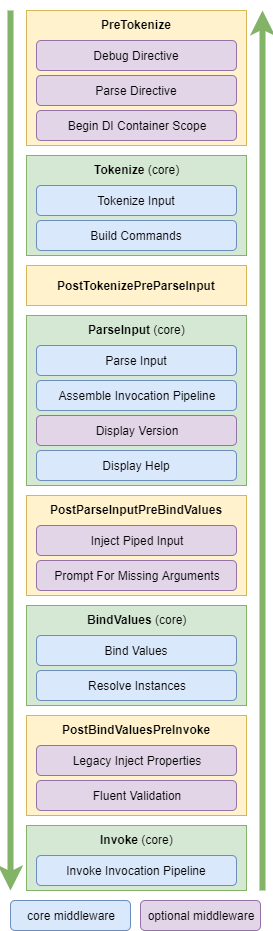
You can register middleware using appRunner.Configure(c => c.UseMiddleware(MyMethod, MiddlewareStages.PreTokenize)).
Middleware will be added in the order you provide for each stage.
appRunner.Configure(c =>
    c
        .UseMiddleware(MiddlwareA, MiddlewareStages.PreTokenize)
        .UseMiddleware(MiddlwareB, MiddlewareStages.PostParseInputPreBindValues)
        .UseMiddleware(MiddlwareC, MiddlewareStages.PreTokenize)
    ))
In this example, MiddlewareC will run immediately after MiddlewareA in the PreTokenize stage and MiddlewareB will run afterwards in the PostParseInputPreBindValues stage.
Specifying order relative to a framework middleware#
If you need to ensure your middleware needs to run immediately before or after a framework middleware, you can use the static class MiddlewareSteps to get the order for the given middleware.
For example, if you need middleware to run before MiddlewareSteps.DebugDirective...
appRunner.Configure(c =>
    c
        .UseMiddleware(MiddlwareA, MiddlewareSteps.DebugDirective - 1)
    ))
These values of the order can change between releases always use the MiddlwareSteps value.
The steps are generally separated by at least a value of 1000 and relative to zero, short.Min or short.Max.
Middleware Config#
It's convenient to use a delegate for middleware when you have additional parameters to pass in.
The pattern we've adopted in CommandDotNet uses a private Config class to keep the parameters.
public static FluentValidationMiddleware
{
    public static AppRunner UseFluentValidation(this AppRunner appRunner, bool showHelpOnError = false)
    {
        return appRunner.Configure(c =>
        {
            c.UseMiddleware(ValidateModels, MiddlewareSteps.FluentValidation);
            c.Services.Add(new Config(showHelpOnError));
        });
    }

    private class Config
    {
        public bool ShowHelpOnError { get; }
        public Config(bool showHelpOnError) =>
            ShowHelpOnError = showHelpOnError;
    }

    private static Task<int> ValidateModels(CommandContext ctx, ExecutionDelegate next)
    {
        var showHelpOnError = ctx.AppConfig.Services.GetOrThrow<Config>().ShowHelpOnError;
        ...
    }
}
This example is from our FluentValidation middleware. Notice UseMiddleware is called before adding the config.
This is intentional because the UseMiddleware method will throws an informative error message when a middleware is registered multiple times.
Adding a duplicate service throws duplicate key exception and is less actionable.
UseTokenTransformation and UseParameterResolver also throw informative error messages so use one of those three methods first to take advantage of the duplicate registration checks.
Registering middleware multiple times#
By default, an exception will be thrown if a middleware delegate is registered more than once. Override this with the option allowMultipleRegistrations parameter in the UseMiddleware registration method. UseMiddleware(MyMethod, step, allowMultipleRegistrations: true)
Error messages#
When possible, middleware should handle it's own errors, printing a message to the console and returning an exit code.
If help should be shown, set commandContext.ShowHelpOnExit=true.
Common Patterns#
Each pattern below shows the recommended MiddlewareStages for registration. Refer to the Middleware Pipeline diagram to understand when each stage executes and what data is available.
Read-Only Middleware#
Middleware that only reads from CommandContext and doesn't modify state, with its registration extension method:
private static Task<int> LogCommandMiddleware(CommandContext ctx, ExecutionDelegate next)
{
    // Read from context
    var command = ctx.ParseResult?.TargetCommand?.Name ?? "unknown";
    Console.WriteLine($"Executing: {command}");

    // Continue pipeline
    return next(ctx);
}

public static AppRunner UseCommandLogging(this AppRunner appRunner)
{
    return appRunner.Configure(c => c.UseMiddleware(
        LogCommandMiddleware,
        MiddlewareStages.PostParseInputPreBindValues));
}
Use cases: Logging, diagnostics, monitoring
Enrichment Middleware#
Middleware that adds data to CommandContext or Services, with its registration extension method:
internal class Database { public Database(string connectionString) { } }

private static Task<int> InjectDatabaseMiddleware(CommandContext ctx, ExecutionDelegate next)
{
    // Add service for commands to use
    var connectionString = ctx.AppConfig.Services.GetOrThrow<Config>().ConnectionString;
    var db = new Database(connectionString);
    ctx.Services.Add(db);

    return next(ctx);
}

public static AppRunner UseDatabaseInjection(this AppRunner appRunner, string connectionString)
{
    return appRunner.Configure(c =>
    {
        c.Services.Add(new Config(connectionString));
        c.UseMiddleware(
            InjectDatabaseMiddleware,
            MiddlewareStages.PostBindValuesPreInvoke);
    });
}
Use cases: Dependency injection, service initialization, context enrichment
Validation Middleware#
Middleware that validates state and short-circuits on failure, with its registration extension method:
private static Task<int> ValidateArgsMiddleware(CommandContext ctx, ExecutionDelegate next)
{
    var parseResult = ctx.ParseResult;
    if (parseResult == null)
    {
        return Task.FromResult(ExitCodes.Error);
    }

    // Perform validation
    var errors = ValidateArguments(parseResult);
    if (errors.Any())
    {
        foreach (var error in errors)
        {
            ctx.Console.Error.WriteLine(error);
        }
        ctx.ShowHelpOnExit = true;
        return Task.FromResult(ExitCodes.ValidationError);
    }

    // Validation passed, continue
    return next(ctx);
}

private static string[] ValidateArguments(ParseResult parseResult) => Array.Empty<string>();

public static AppRunner UseCustomValidation(this AppRunner appRunner)
{
    return appRunner.Configure(c => c.UseMiddleware(
        ValidateArgsMiddleware,
        MiddlewareStages.PostParseInputPreBindValues));
}
Use cases: Argument validation, permission checks, precondition verification
Wrapper Middleware#
Middleware that performs actions before and after command execution, with its registration extension method:
private static async Task<int> TransactionMiddleware(CommandContext ctx, ExecutionDelegate next)
{
    var config = ctx.AppConfig.Services.GetOrThrow<Config>();
    var db = ctx.Services.GetOrThrow<Database>();

    using var transaction = db.BeginTransaction();
    try
    {
        // Execute command
        var exitCode = await next(ctx);

        // Commit or rollback based on result and dryrun setting
        if (exitCode == 0 && !config.DryRun)
        {
            transaction.Commit();
            ctx.Console.WriteLine("Transaction committed");
        }
        else
        {
            transaction.Rollback();
            ctx.Console.WriteLine("Transaction rolled back");
        }

        return exitCode;
    }
    catch
    {
        transaction.Rollback();
        throw;
    }
}

public static AppRunner UseTransactions(this AppRunner appRunner, string connectionString, bool dryRun = false)
{
    return appRunner.Configure(c =>
    {
        c.Services.Add(new Config(connectionString) { DryRun = dryRun });
        c.UseMiddleware(
            TransactionMiddleware,
            MiddlewareStages.PostBindValuesPreInvoke);
    });
}
Use cases: Transactions, timing, resource management, exception handling
Anti-Patterns to Avoid#
❌ Modifying Arguments After Binding#
Don't modify argument values after the BindValues stage. See the Middleware Pipeline to understand when BindValues runs.
// BAD - modifying after binding
private static Task<int> BadMiddleware_ModifyingAfterBinding(CommandContext ctx, ExecutionDelegate next)
{
    // This happens too late - values are already bound to method parameters
    // This middleware is registered in PostBindValuesPreInvoke but tries to modify argument values
    var arg = ctx.ParseResult?.TargetCommand?.Operands.FirstOrDefault();
    if (arg is not null)
    {
        arg.Value = "modified";  // Too late! Already bound to parameters
    }
    return next(ctx);
}

// BAD - Wrong stage for modifying argument values
public static AppRunner UseBadArgumentModifier(this AppRunner appRunner)
{
    return appRunner.Configure(c => c.UseMiddleware(
        BadMiddleware_ModifyingAfterBinding,
        MiddlewareStages.PostBindValuesPreInvoke));  // Too late! Use PostParseInputPreBindValues instead
}
Why: Values have already been bound to method parameters in BindValues stage. To modify argument values, register in MiddlewareStages.PostParseInputPreBindValues or earlier.
❌ Catching and Hiding Exceptions#
Don't swallow exceptions without proper handling:
// BAD - hiding errors
private static async Task<int> BadMiddleware_HidingExceptions(CommandContext ctx, ExecutionDelegate next)
{
    try
    {
        return await next(ctx);
    }
    catch (Exception)
    {
        return 0;  // Pretending everything is fine - BAD!
    }
}
Why: Makes debugging impossible. Either handle specifically or let it propagate.
❌ Registering in Wrong Stage#
Don't register middleware in a stage where required data isn't available. Review the Middleware Pipeline diagram to understand what CommandContext properties are populated at each stage.
// BAD - checking ParseResult in PreTokenize stage
private static Task<int> BadMiddleware_WrongStage(CommandContext ctx, ExecutionDelegate next)
{
    var result = ctx.ParseResult;  // null in PreTokenize!
    if (result?.TargetCommand is null)
    {
        return Task.FromResult(ExitCodes.Error);
    }
    return next(ctx);
}

// BAD - Registered in wrong stage
public static AppRunner UseBadParseResultChecker(this AppRunner appRunner)
{
    return appRunner.Configure(c => c.UseMiddleware(
        BadMiddleware_WrongStage,
        MiddlewareStages.PreTokenize));  // ParseResult not available yet!
}
Fix: Register in MiddlewareStages.PostParseInputPreBindValues or later where ParseResult is available.
❌ Stateful Middleware#
Don't store state in middleware class fields:
// BAD - shared state between invocations
public class BadMiddleware_Stateful
{
    private static int _callCount = 0;  // Shared between runs - BAD!

    public static Task<int> Execute(CommandContext ctx, ExecutionDelegate next)
    {
        _callCount++;  // Race conditions in parallel tests!
        Console.WriteLine($"Call count: {_callCount}");
        return next(ctx);
    }
}
Why: Breaks parallel test execution and causes race conditions. Use CommandContext.Services or CommandContext properties instead.
Testing Your Middleware#
Unit Testing#
Test middleware in isolation using TestTools:
public class MyApp
{
    public void Command(string arg) { }
}

private static Task<int> MyMiddleware(CommandContext ctx, ExecutionDelegate next)
{
    if (ctx.ParseResult?.TargetCommand?.Name == "command")
    {
        var arg = ctx.ParseResult.TargetCommand.Operands.FirstOrDefault();
        if (arg?.Value?.ToString() == "--invalid-arg")
        {
            ctx.Console.Error.WriteLine("invalid");
            return Task.FromResult(1);
        }
    }
    return next(ctx);
}
Integration Testing#
Test middleware with full pipeline:
private class TestDatabase
{
    public List<Transaction> Transactions { get; } = new();

    public Transaction BeginTransaction()
    {
        var tx = new Transaction();
        Transactions.Add(tx);
        return tx;
    }
}
Capturing State#
Use the Capture State feature to inspect middleware behavior:
public static void CaptureState_Example()
{
    var result = new AppRunner<MyApp>()
        .Configure(c => c.UseMiddleware(MyMiddleware, MiddlewareStages.PostParseInputPreBindValues))
        .RunInMem("command test");

    // Verify middleware execution and state
    // result.ExitCode.Should().Be(0);
    // result.Console.Out.Should().Contain("expected output");
}
See Testing Middleware for more details.
Checklist for New Middleware#
- Named with descriptive method name
- Registered in appropriate stage (review Middleware Pipeline diagram)
- Verified required
CommandContextproperties are available at chosen stage - Config class for parameters (if needed)
- Handles errors gracefully
- Returns appropriate exit codes
- Doesn't store state in static fields
- Has unit tests
- Has integration tests
- Documented in code and/or user docs
Related#
- Middleware Architecture - Understanding the pipeline
- Testing Middleware - Detailed testing guide
- Interceptors - Alternative to middleware for command-specific logic